
Poster Maker Machine for Schools: What It Is and How In-House Poster Printing Works
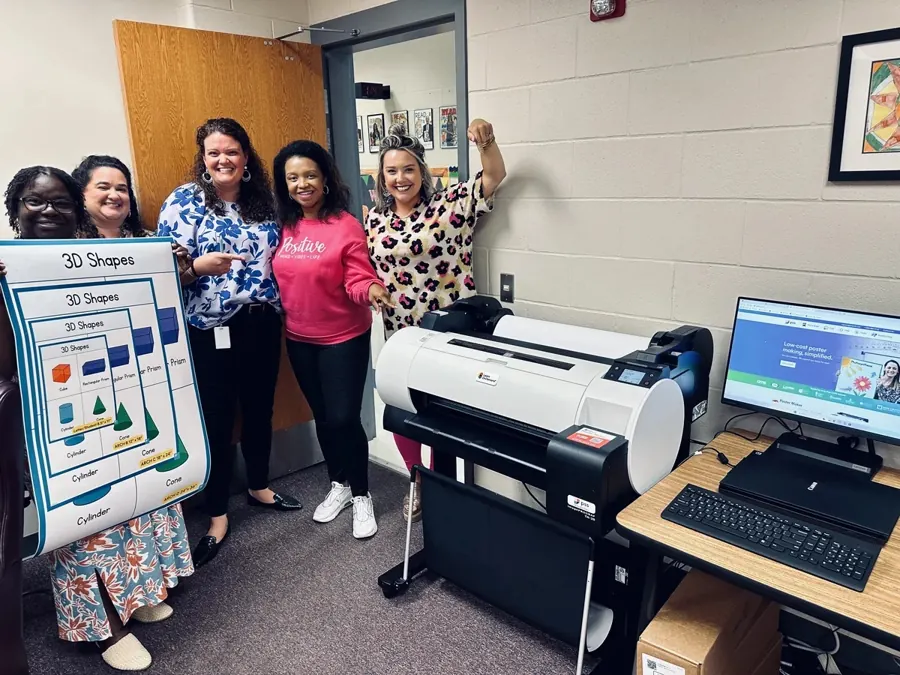
A poster maker machine for schools is a wide-format printer packaged with the hardware, software and support a school building needs to produce its own large-format prints. The printer is the visible part. What separates a school system from a wide-format printer bought on its own is everything around it: a workstation configured to drive it, installation, staff training, a warranty with someone to call, and a supply chain for paper and ink. This guide covers what these systems include, how the day-to-day workflow runs, what schools print, and how in-house production compares with sending jobs out.
What a school poster maker machine is
The machine itself is a wide-format inkjet printer, typically loaded with roll paper rather than cut sheets. Roll feeding is what makes poster sizes practical: the printer pulls the length it needs for each job, so a 24-by-36-inch anchor chart and a 24-by-60-inch hallway banner come off the same roll without changing stock.
Print width is the specification that defines the category. A 24-inch printer produces posters up to 24 inches on the short side and effectively unlimited length, which covers standard poster sizes and most classroom and hallway work. Wider machines exist at 36 and 44 inches and cost more to buy and to supply. The PSS Poster Maker System is built around a 24-inch Canon wide-format printer.
What makes a machine a school poster maker is not a different printing technology. It is the packaging: a vendor that sells to school business offices, accepts purchase orders, installs on site, trains teachers rather than print technicians, and stocks the consumables that particular printer takes.
What a turnkey school poster maker system can include
Vendors in this category sell bundles rather than bare printers, and the contents vary. Components you will see across the market include:
- A wide-format printer, usually 24 or 36 inches
- A workstation computer, preconfigured and ready to drive the printer
- Software preinstalled on that workstation
- A starter set of ink and at least one roll of paper
- Installation, either on site or guided remotely
- Staff training, in person or by webinar and video
- A warranty, most commonly one year, with extended terms sold separately
- A template or content library
Compare bundles line by line rather than by headline price, because two systems at similar prices can differ substantially in what arrives in the box.
The workflow: design, then print
Design is the part schools have already solved. Most teachers already build materials in Canva, Google Slides or PowerPoint. A poster maker does not replace those tools; it prints what comes out of them.
The practical sequence is short:
- Build the file at the finished dimensions, or set the page size to the same proportions as the final poster.
- Export to PDF, which preserves fonts and layout more reliably than sending the working file.
- Open the PDF on the poster maker workstation and choose the paper size or roll width.
- Print.
A poster comes off the PSS system in about two minutes once it is set up, and a teacher can go from an idea in Canva to a finished poster in roughly fifteen minutes. The gap between those two figures is design time, not print time, which is the honest way to set expectations with staff.
What schools print
The printer earns its place through volume and variety rather than any single use. Common categories include:
- Anchor charts and instructional visuals sized to be read from the back of a room
- PBIS and behavior-expectation signage for classrooms and common areas
- Hallway and entrance displays for families and visitors
- Event, athletics and performance banners
- Wayfinding and safety signage
- Testing-week and seasonal displays
- Bilingual visuals for multilingual classrooms
- Student-created work printed at display size
Paper, ink and materials
Roll media is not limited to paper. Systems in this category print on standard and premium coated paper, peel-and-stick, magnetic media, vinyl and waterproof banner material, canvas, and wrapping paper. Material choice is mostly a durability and mounting decision: paper for items that change with the calendar, peel-and-stick or magnetic for surfaces that will not take tape, vinyl for anything going outdoors or near water.
Ink is the recurring cost that catches schools out. A starter set ships with most systems and covers a few hundred posters depending on coverage; dense, dark, full-bleed designs consume noticeably more than line-art charts. Supplies are usually specific to the printer generation, so reordering means matching the machine rather than picking a generic cartridge.
In-house versus outsourced turnaround
The case for in-house production is usually about timing rather than price alone. Publicly listed print-service terms give a sense of the outsourced baseline. FedEx Office states that turnaround varies by poster type, size, quantity and location, and that many poster orders are ready within 24 hours with in-store pickup, while others need additional production time. Its Poster Prints start at $17.25 each, in sizes from 16 by 20 up to 36 by 48 inches. Those are production windows at the vendor, before a school adds its own approval, ordering and pickup steps.
In-house, the constraint is different. The file has to be ready and the printer has to have supplies. When both are true, the poster exists the same period.
| Outsourced | In-house | |
|---|---|---|
| Typical production window | Often within 24 hours, longer for some orders | Minutes per poster once the file is ready |
| Per-item cost | Quoted per poster or per square foot | Paper and ink, plus the amortized system |
| Reprints and corrections | A new order | Reprint immediately |
| Constraint | Vendor queue and pickup | Supplies on hand and staff comfort |
Maintenance, warranty and what happens when something breaks
Wide-format inkjets need light, regular use more than they need servicing. Printers that sit unused for long stretches are more prone to clogged nozzles than printers that run weekly, which is why summer and winter breaks are worth planning for.
Warranty terms are worth reading closely, because "support" can mean a phone number, a parts-only policy, or an on-site visit. The PSS Poster Maker System includes a two-year on-site warranty, and around 80 percent of issues are resolved remotely by phone, with an on-site repair or a replacement printer if a repair is not successful. With regular maintenance, PSS poster makers remain operational for more than five years, with some systems running beyond ten.
How PSS configures its system and where the Every-Wall Plan fits
The PSS Poster Maker System is a 24-inch Canon wide-format printer with a preconfigured PC workstation, preinstalled software, ink for about 166 posters, and a two-year on-site warranty. Installation takes about 40 minutes, either in person or guided, and training runs about 20 minutes in person, by webinar or through recorded video. The system is $4,599 for the 2026-27 school year.
The Principal's Every-Wall Plan packages the same production capability differently. At $5,899 in Year 1, it covers a new printer and workstation, a two-year on-site warranty, staff training, access to the Folio library of resources in English and Spanish, and unlimited paper and ink for twelve months. Renewal is $2,399 per year. Reviewing the public product and package pages of ten K-12 poster maker vendors in September 2026, this was the only plan of its kind we identified in the category.
PSS K12 has served K-12 schools since 1994 and more than 2,900 schools use its systems. The company is veteran-owned and based in Mooresville, North Carolina.
Frequently asked questions
What machine is used to make posters in schools?
A wide-format inkjet printer loaded with roll paper, usually sold as a package with a workstation, software, installation, training and a warranty. Most school systems are 24 or 36 inches wide.
What is the best poster maker machine for schools?
There is no single answer, because the right machine depends on print width, expected annual volume, how supplies are purchased, and what support the building needs. Comparing print width, what is included in the bundle, the supply model, training and warranty terms side by side is more useful than ranking machines.
How long does it take to print a poster on a school poster maker?
A poster prints in about two minutes on the PSS system once the file is ready. Design time is separate and usually the longer part.
What can a school poster maker print besides posters?
Standard and premium paper, peel-and-stick, magnetic media, vinyl and waterproof banner material, canvas, and wrapping paper, which covers anchor charts, signage, banners, magnets and fundraising items.
Sources
- PSS Poster Maker System, contents, installation, training and warranty: https://pssk12.com/poster-maker
- The Principal's Every-Wall Plan, pricing and inclusions: https://everywall.pssk12.com
- Every-Wall Plan overview and renewal pricing: https://everywall.pssk12.com/overview
- PSS supplies by printer generation: https://shop.pssk12.com
- FedEx Office poster printing, starting prices, sizes and turnaround: https://www.office.fedex.com/default/posters
- MIT Copytech large-format printing rates: https://copytech.mit.edu/print-and-copy-services/large-format-printing