
How to Print Large Posters at School: Sizes, Paper, and Materials (Paper, Vinyl, Magnetic, Peel-and-Stick, Canvas)
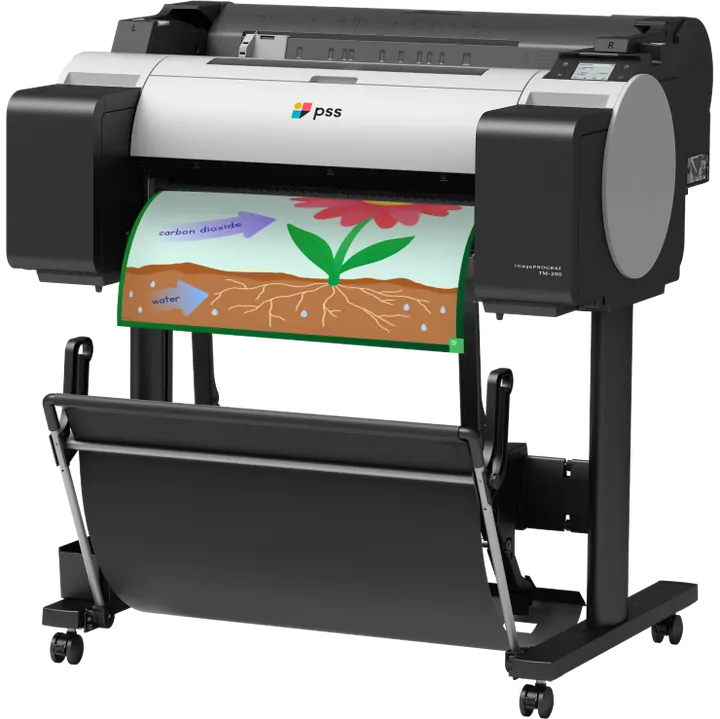
Printing a large poster at school is mostly a file-preparation problem. The printer will produce what it is given; whether the result is sharp, correctly sized, and readable from across a room depends on decisions made before anything is sent to print. This guide covers standard sizes, how to set files up in the tools teachers already use, which material to choose, how far a set of ink goes, and how to fix the problems that come up most often.
Standard Poster Sizes and What a 24-Inch Printer Produces
Wide-format school printers use roll media, which is why poster length is flexible and width is not. A 24-inch printer prints up to 24 inches on one axis and effectively any length on the other.
Common sizes and where each is used:
| Size | Typical use |
|---|---|
| 18 x 24 in | Small classroom signage, single-concept charts |
| 24 x 30 in | Standard classroom anchor charts |
| 24 x 36 in | The default school poster; charts, PBIS matrices, hallway signs |
| 24 x 48 in | Tall vertical references, number lines, timelines |
| 24 x 60 in and longer | Banners, word walls, event signage |
A 24-inch printer covers all of these. Where a display needs to be wider than 24 inches, the usual approach is to print two or more panels and mount them side by side, which works well for word walls and long timelines.
Preparing Files: Canva, Google Slides, PowerPoint, and PDF
Set the document to the finished size before you design. Resizing at the end is where most quality problems originate.
Canva. Choose Custom size when creating the design and enter the final dimensions in inches. To export, use Share, then Download, then PDF Print. That setting produces a higher-resolution file than the standard PDF option.
Google Slides. File, then Page setup, then Custom, then enter the dimensions and choose Inches. For a 24-by-36-inch poster, enter 24 and 36 directly. Slide size applies to the whole presentation rather than to individual slides, so set it before you design. Download as PDF. If you prefer to work at a smaller canvas, building at a matching proportion such as 12 by 18 inches and scaling at print time also works, provided the proportion is identical.
PowerPoint. Design, then Slide Size, then Custom Slide Size, and enter the dimensions. PowerPoint accepts sizes up to 56 inches, so most school posters can be set at full size directly. Save as PDF.
Four rules that apply regardless of tool:
- Export to PDF. It preserves fonts and layout; a working file may reflow on another machine.
- Use high-resolution images. An image that looks fine on screen at 4 inches wide may be visibly soft at 24 inches. Aim for images whose pixel dimensions are at least 150 times their printed size in inches.
- Size text for viewing distance. Roughly one inch of letter height per ten feet of expected viewing distance.
- Leave a margin. Keep important content at least half an inch from the edge.
Paper Types and When Each Is Appropriate
Standard paper is the workhorse: matte or lightly coated stock for anything that will be replaced within the year. Most school printing should be on it.
Premium coated paper has a smoother surface, better color saturation, and more resistance to handling. Worth it for entrance displays, year-long reference charts, and anything photographed for the school's communications.
The choice is usually about lifespan rather than appearance. A bulletin board that changes in six weeks does not need premium stock.
Specialty Materials
| Material | Use it for | Notes |
|---|---|---|
| Peel-and-stick | Cinderblock, tile, and painted walls where tape fails or damages paint | Removable; good for classroom and corridor signage |
| Magnetic | Whiteboards, lockers, metal doors | Repositionable all year; useful for rotating displays |
| Vinyl and waterproof banner | Outdoor banners, gyms, cafeterias, science labs | The correct choice anywhere moisture or washing is involved |
| Canvas | Recognition and legacy displays | For pieces intended to last years |
| Wrapping paper | Fundraising and spirit items | Used by parent organizations as a revenue line |
Matching material to surface avoids the two most common failures: signage that falls off cinderblock, and paper posters that buckle in a humid space.
Ink: How Far a Set Goes and How to Store It
Ink consumption tracks coverage, not poster count. A text-based anchor chart on white paper uses a fraction of what a full-bleed photographic display consumes. A starter ink set shipped with a school system commonly covers somewhere in the range of a couple of hundred posters, depending entirely on what is printed.
Practical habits that reduce consumption and waste:
- Design on white or light backgrounds where the content allows, which is also more legible at distance
- Proof at small size before printing a full sheet
- Print in draft mode for internal proofs and full quality only for display pieces
- Reorder before a cartridge is empty, so the printer is never down during a busy week
Over breaks, the main risk is drying rather than expiry. General practice is to leave cartridges installed rather than removing them, keep the printer powered so it can run its own maintenance cycles, and print occasionally during long closures. Follow the printer manufacturer's guidance for your model, or ask PSS support what it recommends for the system in your building. Store spare cartridges and rolls sealed, away from direct sunlight and temperature extremes.
Common Problems and Fixes
Banding, or horizontal lines across the print. Often a partially clogged printhead. Run the printer's cleaning cycle, then a nozzle check. Cleaning cycles consume ink, so if banding persists, follow the printer manufacturer's maintenance guidance or contact PSS support rather than repeating cycles indefinitely.
Colors look different from the screen. Screens emit light and paper reflects it, so exact matching is not achievable. Reduce the gap by proofing small, using the paper profile that matches the loaded stock, and avoiding very dark backgrounds where slight shifts are most visible.
The poster prints at the wrong size. Almost always a mismatch between document dimensions and print settings. Check that the document is at final size or a matching proportion, and that scaling is set to 100 percent or Fit to page deliberately rather than by accident.
Images look pixelated. The source image lacked resolution for the printed size. Replace it with a larger original; enlarging a small file in the design tool does not add detail.
Paper jams or misfeeds. Usually a loading issue. Reload the roll squarely, check that the media setting matches the loaded stock, and make sure the roll is not damaged at the leading edge.
Text is unreadable from across the room. Distance rule not applied at design time. Increase heading size and reprint; it is cheaper than a poster nobody reads.
Where to Buy Supplies for PSS Poster Makers
Supplies are specific to the printer, so match the generation rather than buying generically. The PSS store stocks ink, standard and premium paper, peel-and-stick, magnetic media, vinyl and waterproof banner material, and canvas, with supply packages grouped by Poster Maker generation from 1.0 through 3.5. Check which generation your building has before ordering; the model is usually on the machine or on the original purchase documentation.
The PSS Poster Maker System is a 24-inch wide-format printer with a preconfigured workstation, preinstalled software, ink for about 166 posters, and a two-year on-site warranty. Schools that print at volume can cover consumables through the Principal's Every-Wall Plan, which includes twelve months of unlimited paper and ink, or through the Never-End Paper + Ink Plan for buildings that already own a poster maker.
PSS K12 has served K-12 schools since 1994 and reports more than 2,900 schools using its systems.
Frequently asked questions
How do you print large posters at school?
Set the document to the finished size in Canva, Google Slides, or PowerPoint, export to PDF, load the correct media in a wide-format printer, match the media setting to the stock, and print. Most school printers use 24-inch roll paper.
What size is a standard school poster?
24 by 36 inches is the most common. Roll printers also handle 18 by 24, 24 by 30, 24 by 48, and longer banner formats up to the width of the roll.
What paper are posters printed on?
Standard matte or lightly coated paper for most school work, premium coated paper for displays lasting a year or more, and specialty media such as peel-and-stick, magnetic, vinyl, canvas, or wrapping paper depending on the surface and environment.
How do you print a poster from Canva?
Create the design at custom dimensions matching the finished poster, then use Share, Download, and choose PDF Print for the highest-quality export. Print that PDF from the poster maker workstation.
Why does my poster print with lines across it?
Banding is often associated with a partially clogged printhead. Run the printer's recommended cleaning cycle and nozzle check. If the problem persists, follow the manufacturer's maintenance guidance or contact PSS support rather than repeatedly running cleaning cycles.
Sources
- PSS supplies, specialty media, and supply packages by printer generation: https://shop.pssk12.com
- PSS Poster Maker System, print width and system contents: https://pssk12.com/poster-maker
- The Principal's Every-Wall Plan and the Never-End Paper + Ink Plan: https://everywall.pssk12.com
- Google Slides Help, change slide size and measurement units: https://support.google.com/docs/answer/3447672
- Microsoft Support, change the size of your slides: https://support.microsoft.com/en-us/office/change-the-size-of-your-slides-040a811c-be43-40b9-8d04-0de5ed79987e
- Canva Help Center, download a design as a print-ready PDF: https://www.canva.com/help/download-pdf-print/
- FedEx Office poster sizes and printing options: https://www.office.fedex.com/default/posters